



Clover is a full POS system from Fiserv – one of the world’s largest financial services companies. Unlike simple card reader providers, Clover combines proprietary hardware, business management software, and payment processing in one integrated package. It’s sold through UK resellers including AIB Merchant Services, Lloyds Bank Cardnet, and First Data.
We rate Clover 6.8 out of 10. The hardware quality and feature set are genuinely impressive – fingerprint login, kitchen displays, 200+ apps, and offline mode. Clover now publishes UK device rental openly, from £15/month, which is more than it disclosed a year ago. The problem is the number that matters most: it publishes no transaction rate at all, stating that pricing is customised for each business. You cannot compare Clover’s card fees against Square or SumUp before a reseller quotes you, and reviews consistently flag contract disputes and unexpected charges.
FREE QUOTE COMPARISON
Compare Merchant Account Quotes from Trusted Suppliers
✓ Save up to 40% on card processing fees
100% free • No obligation • Takes under 2 minutes
This review covers Clover’s hardware range, features, pricing structure, and how it compares to alternatives – including the transparency issues that UK businesses need to watch for.
- Device rental from £15/month - Flex and Flex Pocket £15, Mini £20, Station Duo £30, published directly by Fiserv
- No published transaction rate - Clover states card pricing is customised per business, so unlike Square (1.75%) or SumUp (1.69%) you cannot compare its fees before requesting a quote
- Best for full-service hospitality and retail - Table management, kitchen display, inventory and staff controls beyond a basic card reader
- 200+ app integrations - Clover App Market connects QuickBooks, Xero, Deliveroo, Uber Eats and WooCommerce
- Fiserv backing provides stability - Owned by Fiserv, the world’s #1 merchant acquirer serving 6 million+ merchant locations
What Clover Offers
Clover is a full POS system – hardware, software, and payment processing in one package. Owned by Fiserv and sold both direct and through UK resellers, with card transaction fees set per business rather than published.
Clover is fundamentally different from providers like Square or SumUp. Those are pay-as-you-go services you sign up for online. Clover is a proprietary system sold through authorised resellers – you get Clover hardware that only works with Clover’s payment processing.
This closed ecosystem has advantages: everything integrates seamlessly, hardware quality is high, and the software is purpose-built for the devices. The disadvantage: you’re locked in. If you switch processors, your Clover hardware becomes unusable.
The platform targets medium-to-large retail and hospitality businesses that need inventory management, staff controls, table management, and multi-location support. Sole traders and pop-up shops are better served by simpler providers.
Hardware Range
Four device options: Flex Pocket (pocket-sized), Flex (portable), Mini (compact countertop), and Station Duo (full POS with customer display). All Clover-proprietary. Clover Go is not listed on Clover’s UK site.
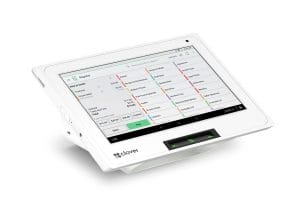
| Device | Type | Key Features | Best For |
|---|---|---|---|
| Clover Flex Pocket | Pocket-sized portable | Built for mobility through the day | Mobile businesses, market stalls |
| Clover Flex | Portable handheld | Built-in scanner, camera, receipt printer | Table service, delivery, field sales |
| Clover Mini | Compact countertop | Large touchscreen, scanner/scale support | Small retail, cafes |
| Station Duo | Full POS station | Dual-screen design, printer, cash-drawer option, customer display | Medium-large retail, restaurants |
All devices accept chip and PIN, contactless cards, and digital wallets (Apple Pay, Google Pay, Samsung Pay). EMV chip technology and tokenisation protect card data. Transactions sync to the cloud automatically across all devices.
Important: Clover UK rents devices rather than selling them outright – £15/month for the Flex or Flex Pocket, £20 for the Mini and £30 for the Station Duo, all plus VAT. Outright purchase prices are not published. This is a different model from Square (£19 reader) or SumUp (from £25), which sell hardware outright.
Software and Features
200+ apps via the Clover App Market, built-in inventory management, staff controls with fingerprint login, table management for hospitality, and offline payment mode.
Clover’s software is its strongest differentiator. The built-in features go well beyond basic payment processing:
- Inventory management – real-time stock tracking with multi-location sync, profit tracking per item
- Staff management – fingerprint login, permission levels, time tracking
- Table management – floor plans, tab management, bill splitting (hospitality)
- Kitchen display system – real-time order routing to kitchen screens
- Loyalty and marketing – built-in loyalty programmes, gift cards, email/SMS marketing
- Reporting – sales analytics broken down by location, staff, and time period
- Offline mode – processes payments without internet connection
The Clover App Market adds 200+ integrations including QuickBooks, Xero, Deliveroo, Uber Eats, and WooCommerce. This extensibility is a genuine advantage over closed systems.
A virtual terminal handles phone and mail orders through any browser. Payment links can be sent via email or SMS for remote payment collection.
Pricing
Clover does not publish a transaction rate – it states pricing is customised for each business. Device rental is published (from £15/month), but card fees and service-plan costs still come from a quote, so total cost stays hard to predict.
| Cost | Amount |
|---|---|
| In-person transaction fee | Not published – customised per business |
| Online/keyed transaction fee | Custom quoted |
| Hardware | Clover device rental from £15/month (Flex and Flex Pocket £15, Mini £20, Station Duo £30) |
| Monthly software fee | Not published – four plans (Payments, Essentials, Register, Table Service) |
| Contract length | Varies by reseller – get the term in writing |
| Settlement | Typically 1-3 business days |
Device rental is now the transparent half of Clover’s pricing: £15 a month for a Flex covers the terminal itself, which is straightforward to compare. The card rate is the opaque half – because Clover publishes none, you cannot work out what £10,000 a month in card payments would actually cost you the way you can with Square (1.75%) or SumUp (1.69%).
The catch: everything else is a black box. Monthly software fees, contract terms, and any add-on charges all depend on your reseller and negotiation. Multiple UK reviews report discovering unexpected charges, contract lengths that didn’t match the sales pitch, and add-on fees for features like VAT breakdowns on receipts.
This lack of transparency is Clover’s biggest weakness. You cannot compare total cost of ownership against providers like Square until you’ve gone through the quote process – and by then, you’re already in a sales conversation.
Customer Experience
Strong marks for hardware quality, setup support, and individual sales reps. Consistent complaints about contract clarity, unexpected fees, and inconsistent after-sales support.
Clover’s UK reviews follow a distinctive pattern. Individual sales reps get name-checked and praised – onboarding is generally smooth, and the hardware impresses from day one. Multiple reviewers report saving money on transaction fees compared to previous providers like Worldpay.
The problems emerge around contracts and ongoing support. Several UK reviewers report:
- Contract terms that didn’t match what was discussed during sales (one reviewer signed what they believed was a 12-month deal but was locked into 48 months)
- Features missing from the basic plan that weren’t flagged upfront (VAT breakdowns on receipts require a paid add-on)
- Slow after-sales support for complex issues – setup problems can delay payment processing
- Manual tip pooling (Square automates this)
The lesson: read every line of the reseller contract before signing, and get all verbal promises in writing. Clover’s hardware and software are strong – the risk is in the commercial terms, not the product.
Pros and Cons
Premium POS system with excellent hardware and, now, openly published device rental. Let down by an unpublished card rate, reseller-dependent terms, and contract transparency issues.
Clover vs Alternatives
Clover publishes no card rate, so its fees cannot be ranked against the others until you have a quote. Square offers a free ecosystem. SumUp is cheapest to start. Clover wins on features for medium-large businesses.
| Provider | Best For | In-Person Rate | Hardware Cost | Key Difference |
|---|---|---|---|---|
| Clover | Medium-large retail/hospitality | Not published | Rental from £15/mo | Full POS, 200+ apps, offline mode |
| Square | All-in-one (free POS) | 1.75% | £19 reader / £149 terminal (+ VAT) | Transparent pricing, free software |
| SumUp | Low-volume / startups | 1.69% | From £25 | Lowest cost to start, no contracts |
| Dojo | Hospitality | 1.2% blended (under £100K/yr) | £0 Tap to Pay / from £179 | Weekend payouts, 600+ EPOS |
| Lightspeed | Multi-location retail | Custom quoted | Custom quoted | Advanced inventory, eCom integration |
For small businesses wanting transparent pricing and a quick start, Square is the better choice. For medium-to-large businesses that need advanced inventory, staff management, kitchen displays, and are comfortable going through a quote process, Clover’s feature set and negotiable card rates make it worth investigating.
Our Verdict
We rate Clover 6.8/10 – premium hardware and a negotiable card rate, but the opaque pricing model and contract transparency issues hold it back.
Premium hardware and newly published device rental from £15/month, but Clover still publishes no card rate, and contract transparency issues hold it back.
FREE QUOTE COMPARISON
Compare Merchant Account Quotes from Trusted Suppliers
✓ Save up to 40% on card processing fees
100% free • No obligation • Takes under 2 minutes
Clover’s product is genuinely good. The hardware quality, feature depth, and 200+ app marketplace put it ahead of simpler providers for businesses that need a full POS system. And it has become more open about hardware: device rental is now published, from £15 a month.
But we can’t rate it higher because of the pricing model. A UK business owner cannot go online, see what Clover costs, and make an informed decision. Everything goes through resellers with variable terms, and reviews consistently report contract surprises. That’s a trust issue, and trust matters when you’re choosing who handles your money.
If you do go with Clover: get quotes from multiple resellers, read every contract clause, and get verbal commitments in writing. The product is worth it – the commercial process needs more scrutiny. For simpler needs, see our best card machines guide or compare payment processing costs.


